Search the archive:
YaBB - Yet another Bulletin Board


Page Index Toggle Pages: 1
Send Topic Print
Gauges Won't Light! (Read 379 times)
Mar 22nd, 2006 at 9:12am

alrot   Offline
Colonel
Freeware Designers Above
All..

Posts: 10231
*****
 
gauges won't light!

Its me again   Roll Eyes  Roll Eyes I been working on the knowledge of the building of and aircraft( a lot)I'm Just about to finish the most difficult part of this.....The entire knowledge of how to make a Big Jet( a heavy one)..After that, the rest is easy ,Very easy.....Well Just the shape of the nose and the time ill spend it,but it worth it.


Still got Issues ,like,Jamm!! (for not to say the bad word)I can't make the Gauges in the virtual panel Light,I follow two tutorials step by step,one is from Milton S."Creating VC Textures Basics for Gmax" and   VC_Lighting_Tutorial from Fr. Bill Leaming, SSG...but this last one its for FS2002,

He saids something about to Apply or insert the xx_L.BMP texture and $XXX in the Material Editor, in the "Self-Illumination" slot at the same time..
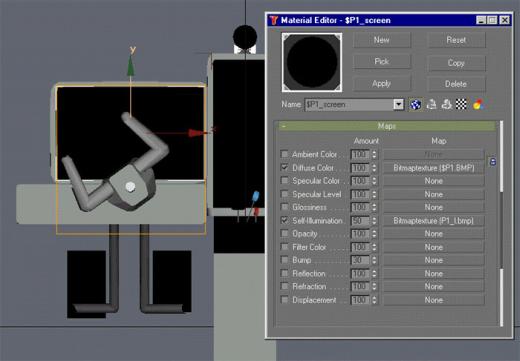


...


This confused me,.Also I follow the Milton's tutorial I use and 32 x 32 or 128 x 128 in 8 bits 256 colors black,and I still don't really know what is an alfa channel is, but i create it in paint sho pro,and with "Image Tool" The one who comes in Gmax,It says so...


let me revuew,I place the  $dummy 32x32,8bit,in the plane or a planar that i create,then I place a secondary image with sufix L like XXX_L 32X32 8b,Black,Over the first dummy image wich this first one $ self iluminate at 50% 60% 100% apply in Gmax or 3d Max,I set it, in 3d studio M,or

Gmax wich I test it,and neither both,.. In the mAKEMDL SOFT.,I fill the box of option "has a light map"(sometimes)then I place this Image _L in the texture aircraft folder,I made in the black_L.bmp, the white points(spray blank effects)upsidedown behind every gauge  ...I try Test After Test,when I consume most of my nights,my brain,and resourses,tire I came here.....


Another question (I Think this should be the last one)..
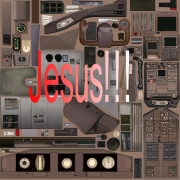
I been working with texturing(I still don't have and Idea how to do it yet),What or how you use a single sheet or image with all parts together,crow it fill it up with docens of images


,How you separate them?I try manualy with UVW maping is hard almost imposible,so I been testing with separate images at 24 bits then I recompress it into a DTX 1,or 3,It work but I don't think having maybe hundreds of separate images in the texture folder wouldn't be a good Idea!.How you do this?

                       ...

.You Know.,The stupid idiot Guide Is a good maybe one of the best,But Im Having trouble to understand the reading in english,The technical vocabulary they use it,Even English speakers ,Don't understand it,


any easy and didactical tutorial recomendation,I'll presiate it,any advice I would be very thanksfully,...


cheers....Alex.

 

...

Venezuela
IP Logged
 
Reply #1 - Mar 22nd, 2006 at 8:01pm

garymbuska   Offline
Colonel
I would rather be flying
Jacksonville, Florida

Gender: male
Posts: 2850
*****
 
I am not sure if this is the same thing but I rember when I built a building with gmax I had to use the xx_lbmp textures for night time which meant I now had two different textures for the same building one for day and one for night.
I never made a aircraft with gmax I tried but wound up going nearly bald Grin
But you might have to do the same thing with the vc.
 
IP Logged
 
Reply #2 - Mar 22nd, 2006 at 8:35pm

alrot   Offline
Colonel
Freeware Designers Above
All..

Posts: 10231
*****
 
Is the same thing Gary, only that $xx disappear is just a map that Gmax or max use it to set the gauges into something (a bmp)and the other works when you hit the light in the night,What interest me is nobody has answer this post,yet  Embarrassed
 

...

Venezuela
IP Logged
 
Reply #3 - Mar 22nd, 2006 at 11:32pm

Milton   Offline
Colonel
Props forever!

Gender: male
Posts: 301
*****
 
It looks like you may have done this correctly however you must use a DXT3 in FS for this to work.

The VC self illumination map in FS must be DXT3 (a compressed 24-bit texture and an 8-bit black (0,0,0)  alpha).  The alpha must be present for gauge backlighting to work.  Generally, 128X128 or larger works well for this.

The texture is an upside-down illumination map for the gauge backlighting and must be stored in the texture folder of the aircraft.

The name must be the same as the file=xxx in the vcockpit section of the panel/cfg or if not used, the same as the texture= name without the $.  The texture name must be suffixed with an _L.bmp.

Apply this texture as a self illumination map in gmax to the $dummy planar along with your main vc bmp.

In FS,  with a black alpha, the gauges will illuminate when nav lights come on.
 

Milton&&Dash 7, Aero Commanders, Howard 500, D18S, Spartan, XP47J, Beechcraft A28 (Grizzly)
IP Logged
 
Reply #4 - Mar 23rd, 2006 at 8:59am

alrot   Offline
Colonel
Freeware Designers Above
All..

Posts: 10231
*****
 
Hi Mr.Milton thanks for your reply Again Roll Eyes[size=0.5]
Im begining to feel like Im bother or Bugging you so much Embarrassed
[/size]I realize this morning by another *.bmp xxx_L(one from the b777)I open one XXX_L with image tool and it says "alpha alpha",instead mine says "alpha none" that is a double bit image,perhaps that's one of the trouble,How can I make in a 24 & 8 bit in a single image?,and after i done without recompresing so the max or Gmax would accept it, them I recompress it into DTX3?Right?
 

...

Venezuela
IP Logged
 
Reply #5 - Mar 23rd, 2006 at 9:13am

Milton   Offline
Colonel
Props forever!

Gender: male
Posts: 301
*****
 
A simple way that many people use is by DXTbmp.  It allows you create and modify extended bmp's easily.  It is freeware and is a seasoned product.

http://www.mnwright.btinternet.co.uk/programs/dxtbmp.htm
 

Milton&&Dash 7, Aero Commanders, Howard 500, D18S, Spartan, XP47J, Beechcraft A28 (Grizzly)
IP Logged
 
Page Index Toggle Pages: 1
Send Topic Print