Search the archive:
YaBB - Yet another Bulletin Board


Page Index Toggle Pages: 1
Send Topic Print
Aileron Cutting in Gmax (Read 202 times)
Feb 14th, 2006 at 9:52am

Travis   Offline
Colonel
Cannot find REALITY.SYS.
Universe halted.
Dripping Springs, TX

Gender: male
Posts: 4515
*****
 
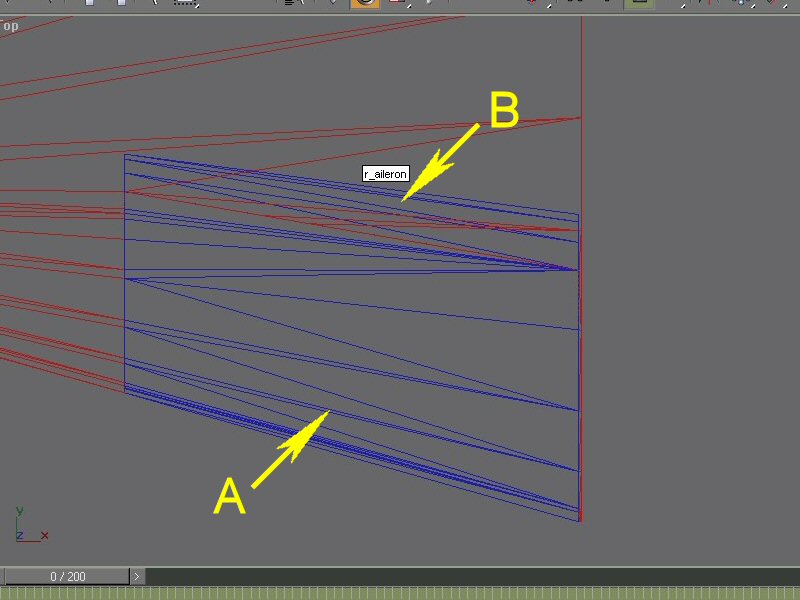
Okay, this is gonna be a bit difficult to explain, so I included some screenshots.

It's been awhile since I used Gmax, and I'm just getting back into the swing of it by throwing something together that I haven't worked on before.  I'm testing my knowledge, sort of like.

So I get to the part where I'm cutting out the ailerons from the wings.  My previous method was to create a full wing and then cut and detach the ailerons/flaps/etc using "Compound Object" and some splines.

So I tried this again, thinking it would work.

Unfortunately, I discovered that I don't remember how I got it right.

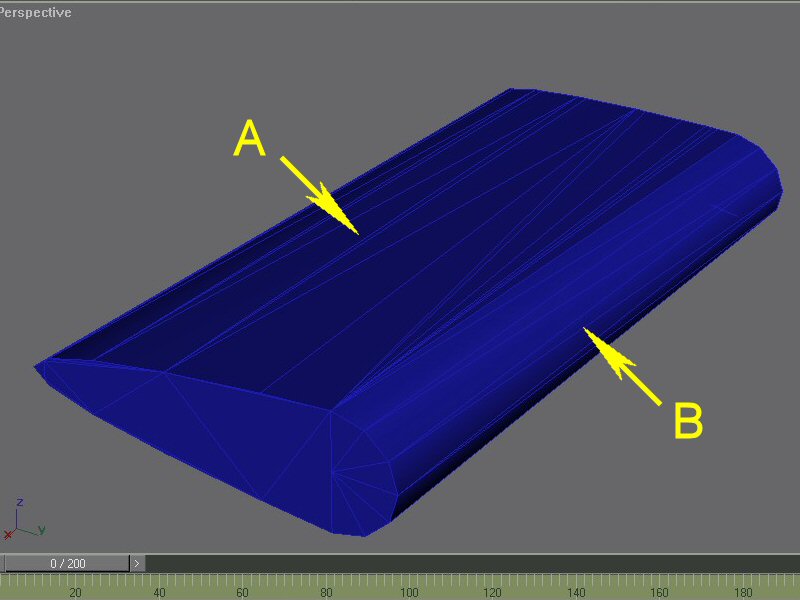
"A" IS THE PART CUT FROM THE WING.
"B" IS A CYLINDER I ADDED FOR VIEWING DURING ROTATION.
...
...

The cylinder was modified to match the taper and skew of the aileron itself, and then attached.  It should now be the axis of rotation, however, I don't seem to remember which angle the axis should be at.


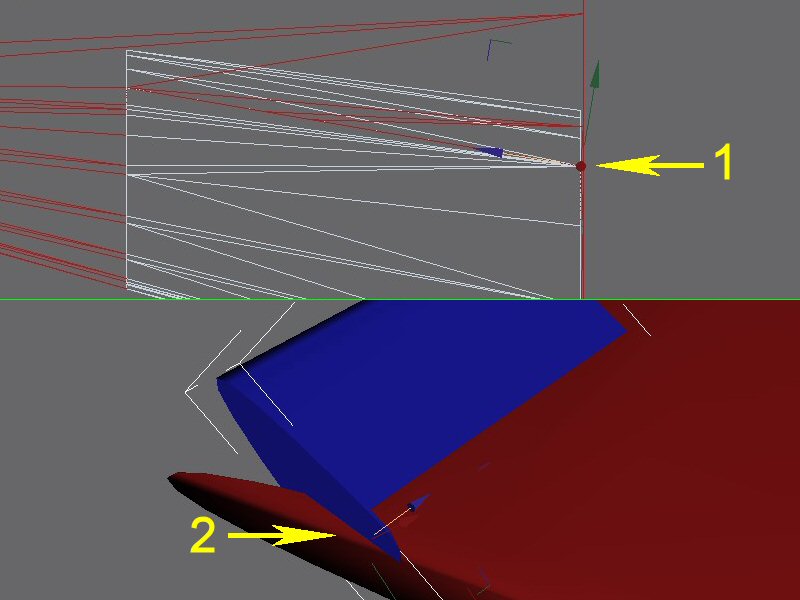
In the following image, the rotation is in line with the axis of the cylinder (1).  That is, the axis of the polys running right to left:
...

The problem here arises from the sides of the aileron "pushing through" the sides of the aileron well (2).


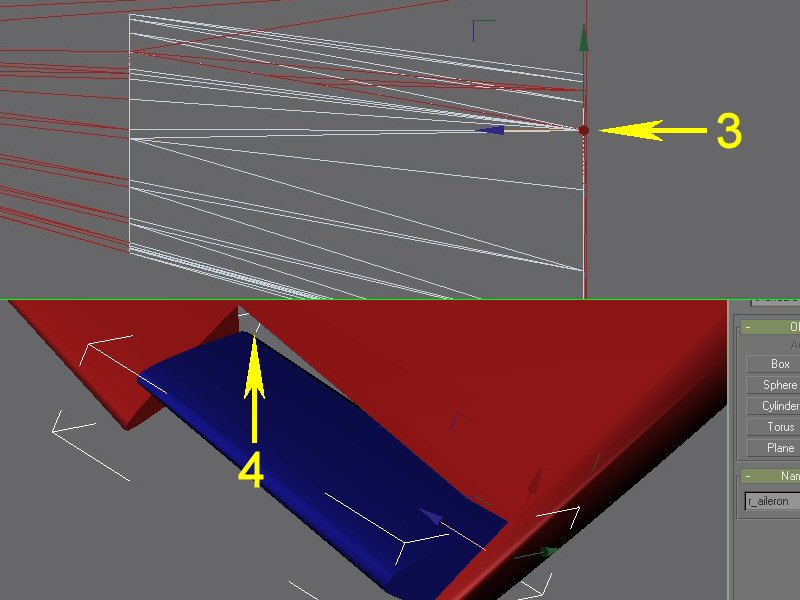
In the following image, the rotation is in line with the axis of the wing cutout (3)  That is, the axis of the aileron itself, running from front to back:
...

The problem here arises from a gap becoming visible as the aileron rotates (4).


So what do I do?  How should I set the rotation?  Or should I go back to square one?  ANYTHING is helpful at this point . . . Sad
 

...
IP Logged
 
Reply #1 - Feb 14th, 2006 at 12:17pm

Felix/FFDS   Offline
Admin
FINALLY an official Granddad!
Orlando, FL

Gender: male
Posts: 1000000627
*****
 
Some thoughts:

You may want to consider cutting the aileron to cover the small extension where you currently have the cylinder attached.  You can create the curvature, i.e. round it off by selecting those two edges and chamfering them a couple of times.

Another way is, if your aileron's front is not open, but still has the capping polygon, exturde/bevel slightly a couple times to "form" the rounded airfoil edge.

Depending on the aileron the actual "hinge" point may be above/below the aileron itself.


As to the open gap in the wing, just close it off by rebuilding the polygon.  Also, I've noted that when cutting out something with a boolean, it makes a difference whether the operand part(s) are closed (capped) or open.


Felix/FFDS...
IP Logged
 
Reply #2 - Feb 14th, 2006 at 2:37pm

Milton   Offline
Colonel
Props forever!

Gender: male
Posts: 301
*****
 
Sometimes on a non-level/angled surface like a wing, cut at an angle, the pivots will do this.

Try either cloning a properly aligned back edge as a separate object with its own pivot (or create a new simple object.)  Position it at the aileron pivot point and ensure its pivot is properly aligned.  Give it the proper aileron tag.  Now link your aileron to that object.

Be sure to use the Local Coordinate system to set your pivots.
 

Milton&&Dash 7, Aero Commanders, Howard 500, D18S, Spartan, XP47J, Beechcraft A28 (Grizzly)
IP Logged
 
Reply #3 - Feb 14th, 2006 at 8:20pm

SkyNoz   Offline
Colonel
Project Kfir!

Gender: male
Posts: 1720
*****


Project Kfir!&&...&&My Gmax page&&Aircraft modeler/Aircarft painter&&&&Aye the key!&&[GeneralEngineData]&&//0=Piston, 1=Jet, 2=None, 3=Helo-Turbine, 4=Rocket, 5=Turboprop
IP Logged
 
Reply #4 - Feb 15th, 2006 at 10:48pm

Travis   Offline
Colonel
Cannot find REALITY.SYS.
Universe halted.
Dripping Springs, TX

Gender: male
Posts: 4515
*****
 
Gosh!  So much info!  I didn't think I was that rusty, but it looks like its time to brush the dust off the "Idiot's Guide" and get to tinkering! Grin

Thanks very much, ya'll . . . Wink
 

...
IP Logged
 
Page Index Toggle Pages: 1
Send Topic Print