Search the archive:
YaBB - Yet another Bulletin Board


Page Index Toggle Pages: 1
Send Topic Print
1st composite WIP: I'm a bit stuck (Read 377 times)
Dec 13th, 2008 at 5:19pm

krigl   Offline
Colonel
Flightsim did me in.

Gender: male
Posts: 8255
*****
 
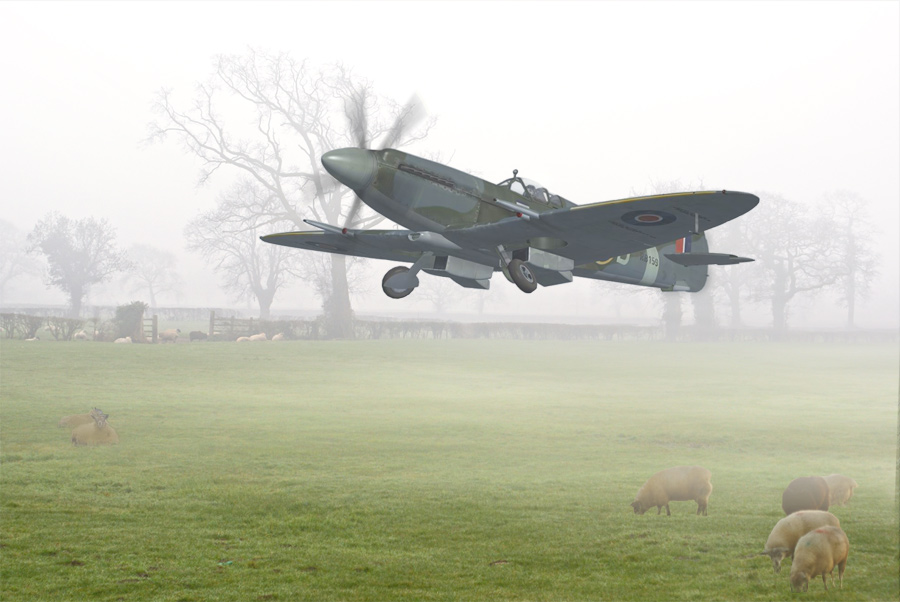
Hi, I'm working on my first ever composite and indeed edit not made by my usual method of taking a perfectly good screenshot and throwing lots of filters, paint and noise at it.

It's not very adventurous I know but here it is - still a WIP.

I've stuffed up the prop and need to work through a decent tute, and I plan to put some mud on the gear. It's misty but some gentle highlights on the plane and a faint shadow might be in order.
...

Here's a bit more work done, can't get the prop any better, blended the plane a bit more, muddied it up a little.

...


What do you think? Anything else I should do? I've tried blending the plane in more (and the sheep  Grin) and haven't had much luck so far. How can I improve it? Is the plane the right size? Sheep too big/small?
In real life they'd be running for their lives, gibbering with terror of course but I can't find the 'frenzy 2D sheep' filter at the moment...

All comments, criticism welcome...

Krigl

« Last Edit: Dec 13th, 2008 at 7:38pm by krigl »  

If you're bored of an evening - and you'll have to be - you can check out my screenshot gallery: Kriglsflightsimscreens...HERE

...
 
IP Logged
 
Reply #1 - Dec 13th, 2008 at 9:02pm

Leigh   Offline
Colonel
"Its not the destination
its the journey."
somewhere over the rainbow

Gender: male
Posts: 1503
*****
 
i would put in some shadows

maybe some wheel marks

i dont no what else

but on the right hand side there is a line where the mist hasn't been done all the way across

the prop look a little small have u seen the DL section at SSW?

anyway its comming up great

keep it up
 

...
IP Logged
 
Reply #2 - Dec 14th, 2008 at 8:48am

Mictheslik   Offline
Colonel
Me in G-LFSM :D
Bristol, England

Gender: male
Posts: 6011
*****
 
Looking good R....As said above the prop needs to be a little bit bigger and perhaps have a smidgen more blur....

If you've still got the aircraft and background on different layers try 1 or 2 stops of motion blur aswell....

Finally, perhaps move the aircraft up a little....it's attitude implies it is climbing and has therefore just taken off but the state of the undercarriage implies that it has been in the air for at least 5 seconds I'd say.....just a small point but it's worth considering.....Smiley

Keep it up Wink

.mic
 

[center]...
IP Logged
 
Reply #3 - Dec 14th, 2008 at 10:28am

eno   Offline
Colonel
Why you shouldn't light
your farts!!
Derbyshire UK

Posts: 7802
*****
 
My method for doing props is to use the prop from the original screenshot. Using the original means that it is the right orientation and size for the aircraft. Using the pen tool roughly cut out round the blurred prop, highlight paths and make the current path a selection and feather it by 5-10 pixels. Move this into the edited shot then use screen  as the layer type and adjust contrast and brightness and maybe colour and saturation to the desired levels .... you may have to repeat the process of moving and blending several times.

As for the mud .... on a copy of the aircraft layer  make small selections in the areas you want splatters .... use the colour pallet dropper to pick a colour from the picture probably the brown of one of the foreground sheep and fill the areas with the colour .... transform and blend as necessary ..... using a separate layer means you won't balls up the aircraft.
 

...
IP Logged
 
Reply #4 - Dec 14th, 2008 at 10:31am

Anxyous   Offline
Colonel
I can has cheezburger?

Posts: 2670
*****
 
I would love to have the RealAir Spitfire in my hangar... *sigh* Sad

Love the edit! Smiley
 

...&&
&&
IP Logged
 
Reply #5 - Dec 14th, 2008 at 4:50pm

krigl   Offline
Colonel
Flightsim did me in.

Gender: male
Posts: 8255
*****
 
Thanks a lot guys for the suggestions, I've bookmarked this topic. Some I will try now and some I can't due to lack of time - I want to give this as a present to someone and need to print it out tomorrow. But next time I will try!!
 

If you're bored of an evening - and you'll have to be - you can check out my screenshot gallery: Kriglsflightsimscreens...HERE

...
 
IP Logged
 
Reply #6 - Dec 15th, 2008 at 1:50am

ManuelL   Offline
Colonel

Gender: male
Posts: 744
*****
 
Looking good! That sheep really must have some nerves. Their not even looking up as the spitfire passes over them.  Wink
 

...
IP Logged
 
Reply #7 - Dec 16th, 2008 at 9:57am

jime59   Offline
Colonel
I Fly Sim!
Streamwood,Il

Gender: male
Posts: 1608
*****
 
I can't find the 'frenzy 2D sheep' filter at the moment...
Grin Grin Grin

Great idea and I think it's coming along just fine. Wink
 

The mind is like a parachute...it only works when it's open.
IP Logged
 
Page Index Toggle Pages: 1
Send Topic Print