Search the archive:
YaBB - Yet another Bulletin Board


Page Index Toggle Pages: 1
Send Topic Print
Getting x/y and pixel size in Paint shop pro 8 (Read 77 times)
Apr 27th, 2005 at 11:01pm

hsvfan   Offline
Colonel
I love YaBB 1G - SP1!
Wellington,  New Zealand

Gender: male
Posts: 262
*****
 
Hi all
I am using paint shop pro 8, to get the coordinates to postion my gauges for my virtual cockpit.
I am a bit confused as to what numbers at the bottom of the screen should be placed in my panel config.
Here is a  picture.
...
I am using the crop tool, is that the correct tool to use? and what number in the image should go into my panel config

Thanks

Rhys
 
IP Logged
 
Reply #1 - Apr 27th, 2005 at 11:17pm

Moach   Offline
Colonel
Jet-Powered PropellerHead
São Paulo, Brazil

Gender: male
Posts: 991
*****
 
hi there...

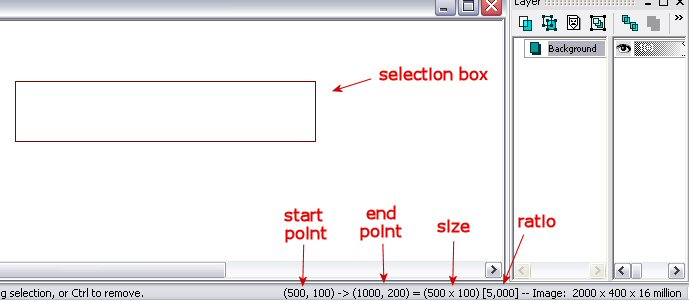
here it is:
...


the start point is where you first click to start dragging out the selection box (in this case, pixel 500x, 100y)

the end point is where your selection ends (pixel 1000x, 200y)

which is equal to a box size of 500 width by 100 height

ad thus has a ratio of 5,000 to 1,000 (box is 5 times wider than it's high) this ratio is for the relation between x and y, where y remains a constant (1,000)

that's pretty much it

what you want to put in te panel.cfg is, in the following order, the starting point x, y coordinates(top left corner of gauge),then width, and height

in this case it would look like this:

gaugexx=gaugename, 500, 100, 500, 100

c ya

Moach

 

Come, one and all aboard!  -  The Russian Roullete in the sky!
One in each Six of my personalities knows not at all how to fly!
IP Logged
 
Page Index Toggle Pages: 1
Send Topic Print