Search the archive:
YaBB - Yet another Bulletin Board


Pages: 1 2 3 
Send Topic Print
KO's Viper and My FX Tweaks!! (Read 777 times)
Reply #30 - Jan 8th, 2004 at 12:36pm

_526th_Fireman   Offline
Colonel
S~ to all fair and honorable
pilots. S~!!
Joshua Texas

Gender: male
Posts: 1148
*****
 
Well, after much tinkering again I finally got what I really wanted.  Got the smoke moved back to give it exactly the look I wanted.

Last thing I want to know from you guys/gals is if you think the smoke needs to be just a little lighter or not? That is the only other thing I might do to give the best look.

As far as packaging it up, I will have to get some permissions as I used a little of other's work and tweaked some of their settings, combined other aspects from other downloads for the Viper and changed up some entries here and there. I will have to research their docs. in their downloads to see if they require permission or if it is truly freeware. But rest assured, I will be working on getting a package up for those interested.

More later.

Oh, one thing I found on the Original Viper installation with Eric Marciano's panel. Some of the Virtual Cockpit entries were wrong and so you didn't get all the VC views.

According to the instructions, in order for the Afterburner to work, once you downloaded Eric's panel, you were to drop in Kirk's panel.cfg file. Using Eric's panel.cfg would cause the AB not to work as there are no panel entries to enable it. Using Kirk's panel.cfg as the instructions tell you to do is fine, except some of the VC cockpit entries are bad.

To fix it: Look at your panel.cfg for the VIPER. Under
[Window Titles] look for these entries:
Fixed Window40=Forward Right
Fixed Window41=Right
Fixed Window42=Rear Right
Fixed Window43=Rear
Fixed Window44=Rear Left
Fixed Window45=Left
Fixed Window46=Forward Left

**Make note of the numbers there and the corresponding View. Now scroll down to the "Fixed Window" Views. Starting with the first one you can see that it says [Fixed Windowxx]!! The xx needs to be changed to 40 so you have [Fixed Window40]. The next one, 41 is good. The others need to be changed according to the bitmap used. Good luck!!

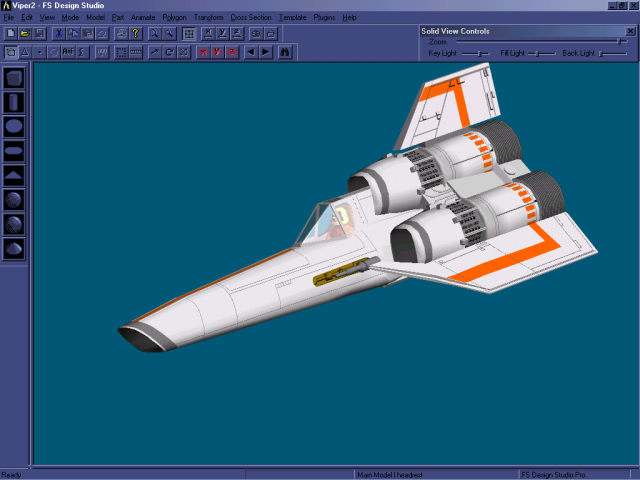
Now the Picture !     Grin


...  


Systemax Sabre Ultimate gaming rig.&&&&I got all the goodies and all the power I need to run anything thrown at me for the next two months!
IP Logged
 
Reply #31 - Jan 8th, 2004 at 1:28pm
Silent Exploder   Ex Member

 
looks much better now! almost real...
 
IP Logged
 
Reply #32 - Jan 8th, 2004 at 3:15pm

Sam 400   Offline
Colonel
Sierra Alfa Mike
Around Birmingham, England, UK

Gender: male
Posts: 540
*****
 
Brilliant! youv'e reached perfection. Nice 1!
Sam 8)
 

Build a man a fire and he'll be warm for a night. Set a man on fire and he'll be warm for the rest of his life.&&...The harrier, Best british aviation! Ever!&&What I'm running on: FS2002 - WindowsXP home edit - emachines 270 - 23.5GB free memory of 40GB. And a new 15
IP Logged
 
Reply #33 - Jan 8th, 2004 at 6:42pm

_526th_Fireman   Offline
Colonel
S~ to all fair and honorable
pilots. S~!!
Joshua Texas

Gender: male
Posts: 1148
*****
 
Thx fellas. Well, I am done. Got the package made up and will be uploading it this evening. It will require you to have one other file, which will be listed.

Enjoy
 

Systemax Sabre Ultimate gaming rig.&&&&I got all the goodies and all the power I need to run anything thrown at me for the next two months!
IP Logged
 
Reply #34 - Jan 9th, 2004 at 4:11am

Delta_   Offline
Colonel
Woah!
London, UK

Gender: male
Posts: 2032
*****
 
I can't wait for it, it is not there yet...
 

My system:Intel Q6600@3.6GHz, Corsair XMS2 4GB DDR2-6400 (4-4-4-12-1T) , Sapphire 7850 OC 2BG 920/5000, X-Fi Fatality, Corsair AX 750, 7 Pro x64
IP Logged
 
Reply #35 - Jan 9th, 2004 at 12:51pm

_526th_Fireman   Offline
Colonel
S~ to all fair and honorable
pilots. S~!!
Joshua Texas

Gender: male
Posts: 1148
*****
 
Good news, the FX Upgrade are now up. Located here:
http://www.simviation.com/fs2004military12.htm

You must have these files installed  to enable mine:
1] Kirk Olsson's USVIPER and Eric Marciano's panel Kirk recommends, available HERE: http://www.simviation.com/fs2004military2.htm
2] Jan Rosenberg's New and Improved Afterburner Fx for the Viper, available HERE: http://www.simviation.com/fs2004military6.htm ; (bottom of page)  and
3] Jan's SHOPX_FX so you can install his DTS Gauges which I use to handle when the wingtip contrails and engine exhaust turn on and off. Available HERE:  http://www.simviation.com/fs2002misc12.htm
SHOPX_FX also has directions for adding Turbo Prop smoke for your FS2004 Props. You should have it anyway!!

There you go boys. ENJOY!!
 

Systemax Sabre Ultimate gaming rig.&&&&I got all the goodies and all the power I need to run anything thrown at me for the next two months!
IP Logged
 
Pages: 1 2 3 
Send Topic Print